
SOVA is a new and fast-evolving Android banking Trojan that poses a serious threat to mobile banking users. Unlike older malware that focuses only on stealing login credentials, SOVA is designed to take deeper control of infected devices. Once installed, it can monitor user activity, capture sensitive information, and interfere directly with banking and financial apps. Its ability to combine multiple attack techniques makes it especially dangerous for users who rely on smartphones for everyday financial transactions.
Let’s learn more about SOVA like how it is different from other malwares, how it infects android devices, working process of SOVA, key capabilities of SOVA, who is at risk from SOVA, common signs of SOVA infection and how to protect against SOVA malware in this blog.
How SOVA differ from traditional banking trojans?
What makes SOVA different from other banking trojans is how quietly it operates. It often disguises itself as a legitimate app or update, tricking users into granting permissions. After gaining access, SOVA can record screens, intercept messages, and steal one-time passwords, allowing attackers to bypass security controls like multi-factor authentication.

Methods through which SOVA Infects Android Devices
SOVA relies heavily on deception rather than technical exploits to get onto a victim’s phone. It is commonly distributed through following methods:
1. Malicious App Distribution
SOVA usually reaches victims through malicious apps that look harmless at first glance. These apps may pretend to be legitimate tools, system updates, utilities, system cleaners, crypto tools, or even fake versions of popular apps. They are often shared through third-party app stores, shady download links, or direct APK files sent via messages and emails.
2. Phishing and Fake Updates
Another common infection method is phishing. Attackers send convincing messages claiming the user needs to update a banking app, enable a security patch, or verify an account. These links lead to fake update pages that install SOVA instead of a legitimate app. Since the message appears urgent and trustworthy, many users act without double-checking.
3. Abuse of Android Permissions
Social engineering plays a key role in SOVA’s success. During installation, SOVA tricks users into granting dangerous permissions, especially Accessibility Services. It may claim that these permissions are required for better performance or security features.
For example, download a “critical update” or a “security fix,” creating a sense of urgency that leads to quick, careless installs. Once approved, SOVA gains extensive control over the device, allowing it to read screen content, track keystrokes, and interact with other apps.

SOVA Working Process After Installation
After installation, SOVA quietly sets itself up in the background. Here is how it functions.
1. Silent Setup and Persistence
SOVA may hide its icon, hide its presence by disabling notifications, use misleading app names, run silently in the background, and register itself to start automatically when the device reboots. These steps ensure the SOVA malware remains active for long periods without user awareness. This also makes it difficult for users to notice or remove SOVA.
2. Command-and-Control (C2) Communication
SOVA connects to remote command-and-control servers controlled by attackers. Through these servers, cybercriminals send instructions, update the malware capabilities, and collect stolen data. This allows SOVA to adapt its behavior based on the target and avoid detection.
3. Continuous Device Monitoring
In the background, SOVA continuously monitors device activity. It can track app usage, capture screens, log keystrokes, intercept SMS messages, and observe notifications. This constant surveillance enables attackers to steal banking credentials, capture one-time passwords, and even manipulate transactions, all while the user believes their device is functioning normally.
Key Capabilities of the SOVA Banking Trojan
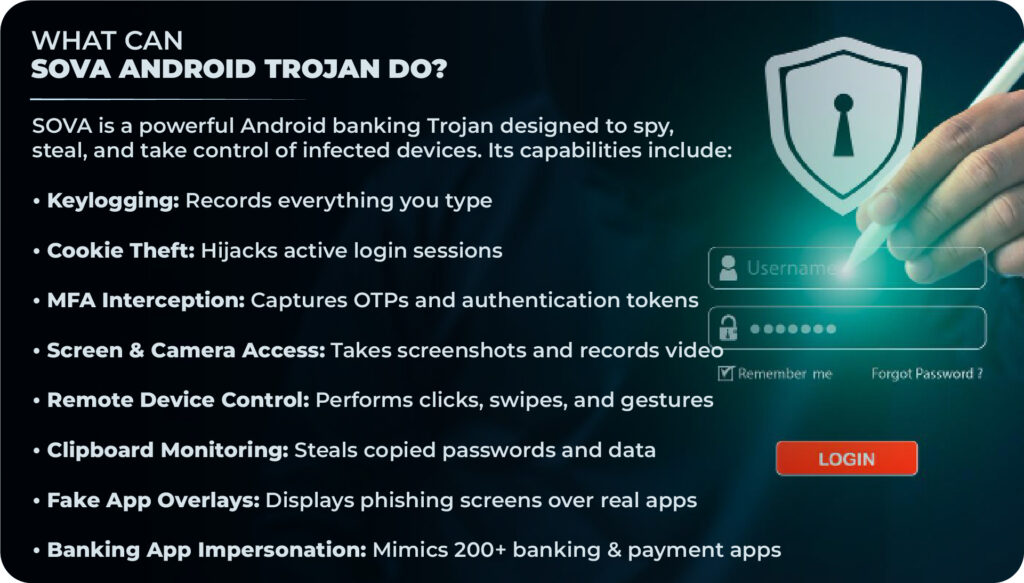
SOVA is built to silently take control of infected Android devices and steal sensitive financial data. Once installed, it uses multiple techniques to spy on users, bypass security controls, and give attackers direct access to banking and crypto accounts. Its key capabilities are as follows:
1. Credential Theft from Banking and Crypto Apps
SOVA is designed to target mobile banking and cryptocurrency applications. It can capture usernames, passwords, and sensitive financial details when users log in, giving attackers direct access to accounts.
2. Screen Recording and Keylogging
The trojan can record screen activity and log keystrokes in real time. This allows attackers to see exactly what the user types or views, even if the app uses additional security layers.
3. Overlay Attacks to Steal Login Details
SOVA uses fake overlay screens that sit on top of legitimate banking apps. When a user opens their bank app, a look-alike login page appears, tricking them into entering credentials directly into the attacker’s hands.
4. SMS Interception and OTP Bypass
To bypass two-factor authentication, SOVA intercepts incoming SMS messages. This includes one-time passwords (OTPs) sent by banks, enabling attackers to complete fraudulent transactions without alerting the user.
5. Data Exfiltration and Remote Control
All stolen data is quietly sent to attacker-controlled servers. In some cases, SOVA also allows remote control of the device, enabling attackers to execute commands, manipulate apps, and expand the attack further.

Who Is at Risk from SOVA Trojan?
SOVA does not target just one type of user. Anyone who uses Android devices for banking, payments, or financial activities can be affected. It affects especially following:
1. Mobile Banking Users
Anyone using banking apps on Android devices is a potential target, especially users who install apps outside official app stores or ignore security warnings.
2. Crypto Wallet Users
Users managing cryptocurrency wallets on their phones face higher risk, as attackers actively seek digital assets that can be transferred quickly and anonymously.
3. Businesses Using Mobile Devices for Financial Operations
Organizations that rely on mobile devices for payments, approvals, or financial management are also vulnerable. A single infected device can lead to broader financial and data exposure.
4. Most Targeted Regions and Industries
SOVA has been observed targeting regions with high mobile banking adoption. Financial services, fintech, and crypto-related users are especially attractive targets due to the direct monetary value involved.
Common Signs of SOVA Infection on Android Devices
SOVA tries to stay hidden, but infected devices often show signs of compromise such as:
1. Major Indicators of Compromise (IoCs)
- Sudden appearance of unknown apps or services
- Frequent crashes or unusual behavior in banking apps
- Unexpected SMS messages being marked as read or missing
2. Unusual App Permissions and Behavior
Infected devices often show apps with excessive permissions, such as Accessibility access without a clear reason. Battery drain, overheating, or performance issues may also occur due to constant background activity.
3. Suspicious Network Traffic
SOVA communicates regularly with external servers. This can result in unusual network traffic patterns, especially when the device is idle. Security tools may flag unknown domains or encrypted connections linked to command-and-control activity.
How to Protect Against SOVA Malware?
Mobile banking and financial apps are prime targets for trojans like SOVA. Regular mobile security testing helps identify weaknesses attackers can abuse, such as insecure permissions, poor input validation, or weak session handling.

Get Expert-led Mobile Security Testing from Peneto Labs
Mobile security assessments help organizations identify risks early, reduce fraud exposure, and protect user trust. At Peneto Labs, we believe no company should suffer from cyberattacks.
Our security experts manually test modern risks such as malicious app behavior, insecure permissions, data leakage, and abuse of mobile OS features. The result is a clear, actionable report that helps you fix issues early, protect users, and keep your mobile applications secure.
2. Keep Devices Updated and Use Mobile Security Tools
Regular OS and app updates patch known vulnerabilities that malware exploits. Using trusted mobile security or antivirus tools (XDR or EDR tools) can also help detect suspicious behavior before serious damage occurs.
3. Follow Android Security Best Practices
Android users should stick to official app stores and avoid downloading APK files from unknown sources. Be cautious of urgent messages asking for app updates or security checks, as these are often used in phishing attacks.
4. Be Careful with App Permissions
Always review the permissions an app requests during installation. Banking trojans like SOVA rely heavily on Accessibility Services and SMS access. If a simple app asks for advanced permissions without a clear reason, that’s a red flag.
6. Bank-Level Detection and Monitoring
Banks and financial institutions should monitor abnormal login behavior, unusual transaction patterns, and device-level anomalies. These signals can help detect infected devices early and prevent fraud.
7. Mobile Device Management (MDM) solution for Corporate Mobiles
Deploying a robust Mobile Device Management (MDM) solution is one of the most effective ways to protect corporate smartphones from threats like SOVA malware. MDM allows organizations to centrally control app installations, restrict accessibility services misuse, enforce OS and security updates, and monitor suspicious device behavior in real time.
If a device shows signs of compromise, IT teams can instantly lock, isolate, or wipe corporate data, preventing credential theft and financial fraud. By enforcing strict security policies on corporate mobiles, MDM significantly reduces the attack surface that banking trojans like SOVA exploit.
Conclusion
SOVA highlights how advanced Android banking trojans have become, using stealth, social engineering, and deep device access to steal financial data. It is no longer enough to rely on basic security controls.
A proactive defense strategy, combining user awareness, secure app development, continuous monitoring, and regular mobile security testing offers the best protection against threats like SOVA. By identifying risks early and strengthening mobile defenses, both users and organizations can stay secure from modern mobile banking attacks.
Peneto Labs has been empanelled by CERT-In to conduct information security auditing services.
Worried about mobile threats like SOVA putting your users or business at risk? Speak to us today to get professional mobile security testing from Peneto Labs and uncover hidden risks before they cause damage.